
Image steganography
Images are the richest carrier for hidden data. How you attack one depends entirely on the format: lossless formats (PNG, BMP) preserve every pixel bit, so data hides in the pixels themselves; lossy JPEG throws pixel bits away during compression, so data hides in the DCT coefficients instead. Always identify the real format first, then pick the technique.
LSB, bit planes and channels
Each pixel channel (Red, Green, Blue, Alpha) is a byte — eight bit planes from the least-significant bit (LSB) to the most-significant (MSB). Hiding a message in the LSBs is nearly invisible to the eye but trivial to extract if you look at the right plane. Variants you will meet: LSB replacement, LSB matching, per-channel or multi-bit encodings, alpha-channel payloads, palette-index hiding, and pixel-value differencing (PVD).
zsteg — the highest-yield single command for PNG/BMP LSB. It reportedly cracks about half of all image challenges on its own.
$ zsteg image.png            # common combinations
$ zsteg -a image.png         # every channel/bit/order combination
$ zsteg -E 'b1,rgb,lsb,xy' image.png > payload.bin   # extract one combination
Reading zsteg -a and extracting the right line. Each result is tagged with
the descriptor that found it, e.g. b1,rgb,lsb,xy .. text: "297980:SnVzdCB...".
The descriptor grammar is b<bits>,<channels>,<lsb|msb>,<xy|yx>, and every knob
is worth flipping: bit count (b1..b8), channel subset (r/g/b/a/rgb),
bit order (lsb/msb), pixel order (xy/yx), and the rarely-tried prime
(only prime-indexed pixels). Re-feed the winning descriptor to pull the bytes:
$ zsteg image.png b1,rgb,lsb,xy          # dump one combination to stdout
$ zsteg -E 'b1,rgb,lsb,xy' image.png > out.bin   # raw bytes -> file / binwalk
A leading length:base64 (the Python stegano library format) is a common
give-away — base64-decode the value after the colon.
Worked example: a ZIP hidden in the LSBs
zsteg -a challenge.png prints
b1,rgb,lsb,xy .. file: Zip archive data. Pull the raw bytes of that exact
combination with zsteg -E 'b1,rgb,lsb,xy' challenge.png > payload.zip, then
unzip payload.zip to recover flag.txt. If -E yields a header you don't
recognize, run file payload.bin first and branch on the real type.
stegoveritas runs the whole battery at once (metadata, every color/plane transform, LSB brute force, trailing-data carve) when you would rather not step through it:
$ stegoveritas image.png
Recognize the embedding library. Matching the extractor to the tool is half the battle — and encrypted-LSB tools produce output that looks like noise, not a clean bit plane:
| Fingerprint | Library | Extract |
|---|---|---|
length:base64 prefix |
Python Stegano (lsb) |
stegano-lsb reveal -i f.png -o out.txt |
| High-entropy LSB, zsteg finds nothing | cloacked-pixel (AES-LSB) | cloackedpixel extract f.png out.txt <pw> |
| Plain LSB, no zsteg hit | stego-lsb / LSBSteg | stegolsb steglsb -r -i f.png -o out.txt -n 2 |
| PNG/JPEG/WebP + password | imgconceal | imgconceal --extract -i f.png -p <pw> |
Encrypted LSB looks like noise, not a plane
A uniformly random-looking LSB plane (cloacked-pixel, some Stegano modes, ML-based SteganoGAN) is itself the tell that the payload is encrypted — no amount of extra bit-plane hunting helps; you need the specific tool and its password.
Bit-plane decomposer (built into Aperi'Solve) and Stegsolve — browse all 32 planes visually (Analyse → Data Extract to pull specific bit/channel combinations). Look for text, a QR code, or sharp edges appearing in a single plane.
The zsteg-found-nothing traps
When zsteg reports nothing, the payload is usually in a place it did not
try by default: the alpha channel, the most-significant bit,
column-major (yx) order, or a single channel. Browse every plane and
channel by hand before moving on.
Once a plane looks structured, script the extraction with Pillow:
# pip install Pillow
from PIL import Image
img = Image.open("file.png")
pixels = list(img.getdata())          # [(r, g, b), (r, g, b), ...]
bits = [px[0] & 1 for px in pixels]   # LSB of the red channel
Comparison with the original. If you can find the cover image (reverse image search on Google or Yandex), XOR the two in Stegsolve to isolate exactly which pixels were altered.
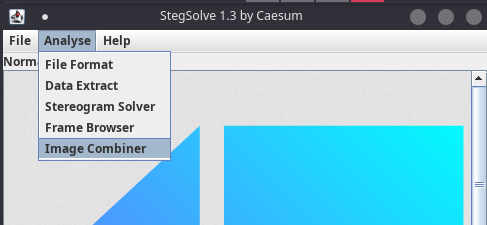
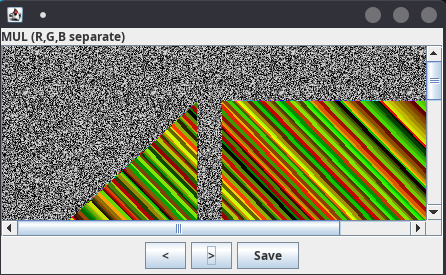
When a challenge hands you several near-identical images, XOR or stack them
against each other (Stegsolve Image Combiner, or Pillow ImageChops) — the
shared cover cancels and only the hidden layer remains.
PNG structure tricks
A PNG is a sequence of chunks: IHDR (header: width, height, bit depth)
first, one or more IDAT (pixel data), IEND last, plus optional chunks like
tEXt/zTXt/iTXt (text), eXIf, iCCP and PLTE (palette). Each chunk
carries a CRC32. This structure is a playground for hiding data.
Validate and enumerate chunks:
$ pngcheck -vtp7 file.png
$ identify -verbose file.png
Extract a chunk's payload. Flags love the text (tEXt/zTXt/iTXt) and
profile (iCCP) chunks, which survive normal viewing. Dump and inspect them:
$ exiftool -icc_profile -b -w icc file.png   # carve the ICC profile blob
$ strings icc.icc                             # ...then read it
For a private/unknown ancillary chunk that pngcheck flags (e.g. a custom
giTs), locate the marker in a hex editor and carve everything after it, then
zlib-decompress. png-parser walks
every chunk programmatically.
Data after IEND. Anything past the IEND chunk is ignored by viewers but
survives in the file — a top hiding spot. pngcheck flags trailing data; carve
it with binwalk or by offset.
Scanline filter bytes and an undersized IDAT. Inside the decompressed
IDAT stream, every scanline begins with a filter-type byte (0–4); an
out-of-range or patterned run of these is a rarely-checked covert channel. A
short IDAT that is not the last one (a full one is 8192 bytes by default) is
itself a tampering signal — zlib.decompress() the stream and inspect the
filter bytes. Note that zsteg needs a structurally valid PNG, so repair CRC
or dimension errors (pngcheck -f, PCRT) before LSB
analysis or it returns nothing.
Corrupt CRC / edited header. A CRC error in IHDR reported by
pngcheck means the header was edited. The classic trick:
a decoder stops after height rows and silently ignores the extra IDAT
bytes, so a shrunken height hides pixels below the visible image. You cannot
pick dimensions freely — brute-force width/height until the computed CRC matches
the stored IHDR CRC (e.g.
ctf-png-size-solver or
png-dimensions-bruteforcer),
or repair the file with PCRT.
TweakPNG edits chunks directly: recompute CRCs, reorder chunks, or change the declared dimensions.
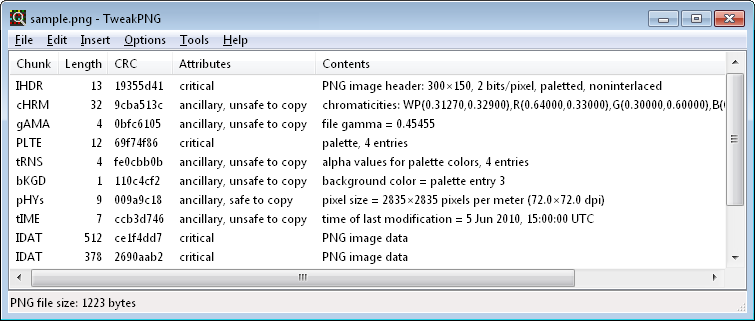
APNG (animated PNG) can hold frames a normal viewer never shows — a zero-duration frame, or a very long first frame. An APNG viewer exposes every frame, and a message can be encoded in the per-frame durations.
JPEG (DCT domain)
JPEG stores quantized DCT coefficients, not raw pixels, and recompresses on save — so LSB-in-pixels tools like zsteg are useless here. Dedicated DCT-domain tools take over:
| Tool | Notes |
|---|---|
| steghide | JPEG/BMP/WAV/AU, password + encryption. Try the empty password. |
| stegseek | Cracks a steghide passphrase against a wordlist in seconds. |
| OutGuess | Redundant-bit JPEG stego; outguess -r file.jpg out.txt. |
| jsteg | JPEG DCT LSB, no encryption. |
| jphide / jpseek | JPHS, DCT LSB with a password. |
| F5 / f5stegojs | Matrix encoding on DCT coefficients. |
| OpenStego | LSB with optional password (mainly PNG). |
$ steghide info file.jpg
$ steghide extract -sf file.jpg -p ''
$ stegseek file.jpg /usr/share/wordlists/rockyou.txt
$ stegseek --seed file.jpg          # detect/extract when encryption is disabled
$ outguess -r file.jpg out.txt      # add -k 'key' if password-protected
Worked example: a passworded JPEG payload
steghide info secret.jpg reports "embedded data", so a payload exists.
Try the empty password first: steghide extract -sf secret.jpg -p ''. If it
refuses, crack it — stegseek secret.jpg /usr/share/wordlists/rockyou.txt
recovers the passphrase and writes the payload in seconds. Still nothing?
The passphrase is often the filename, the challenge name, or a string from
exiftool — try those before a bigger wordlist.
Embedded thumbnail mismatch. A JPEG's EXIF thumbnail is a separate small image that editors often forget to update — it can still show the original, uncensored picture (or a QR):
$ exiftool -b -ThumbnailImage file.jpg > thumb.jpg # also -PreviewImage, -JpgFromRaw
F5 hides in DCT coefficients with matrix encoding and survives where steghide
and jsteg fail. Extract with f5stegojs
(f5stego -x -p <key> file.jpg out.bin) or the original Java Extract.
Error Level Analysis finds pasted regions (tampering, not embedding): resave at a known quality and diff, or use an online ELA tool — edited 8×8 blocks glow at a different error level than the untouched background.
For detection, stegdetect runs statistical DCT analysis (jsteg / jphide /
outguess / F5) — see Steganalysis.
GIF
GIFs are animated and use an indexed palette of up to 256 colors, so support in steganalysis tools is patchy — but a few tricks recur:
- Hidden frames with zero duration are not visible during playback.
- A message can be encoded in the frame durations (morse/binary/ASCII).
- Data can hide in the color palette or the difference between frames.
$ ffmpeg -i file.gif -vsync 0 out/f%d.png        # extract frames
$ gifsicle --explode file.gif                     # alternative frame split
$ compare frame_001.png frame_002.png diff.png    # ImageMagick: pixels that changed
When frames look identical, the payload is usually the handful of pixels that change between them — diff consecutive frames and read the changed pixels as binary. (Stegsolve's Image Combiner does the same with XOR/SUB.)
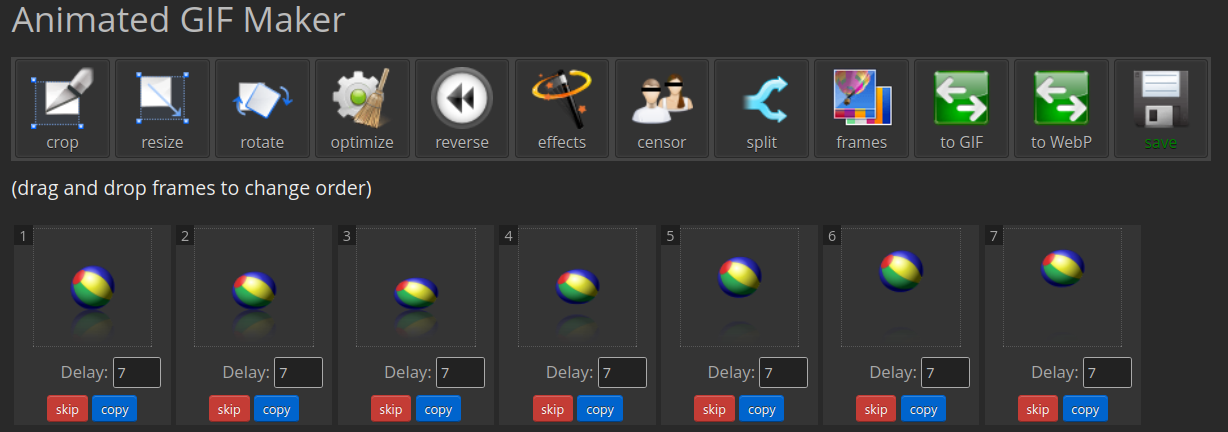
GIF Maker makes manual GIF manipulation easy.
Palette and color-index tricks
On indexed-color images (PNG-8, GIF), the pixels are indices into a palette. Two near-identical palette entries can hide a second image that only appears when you remap the colors.
Color remapping (built into Aperi'Solve) generates several random palette remaps automatically. StegOnline and GIMP let you browse and randomize the palette by hand.
Alpha-channel payloads. A fully transparent PNG with "nothing" in RGB often
hides everything in the alpha channel. Sometimes the data is not a bit plane but
an arithmetic encoding — read the pixels and try transforms like chr(255 - a):
from PIL import Image
px = Image.open("file.png").convert("RGBA").getdata()
print("".join(chr(255 - a) for (r, g, b, a) in px if a != 255))
Other raster formats (BMP, WebP, ICO)
- BMP — uncompressed, so it is a prime LSB carrier;
zsteg -a file.bmpworks here just like PNG (a common blind spot is thinking zsteg is PNG-only). - WebP — convert lossless WebP to PNG first (
dwebp file.webp -o file.png), then run the PNG toolkit. When upscaling to reveal a faint pattern, use nearest-neighbor (magick file.webp -filter point -resize 400% out.png) — bilinear/bicubic averaging destroys the LSB data. - ICO — a container of several images at different sizes; extract them all
(
icotool -x file.ico) and check each.binwalkalso catches appended data in all three.
Frequency-domain analysis
Some payloads are invisible in the spatial domain but obvious in the frequency domain. Aperi'Solve, StegOnline and Fourifier render the FFT of an image, where periodic patterns and hidden marks stand out.
Decoding the recovered image
Extraction often yields another image rather than the flag directly:
- QR / barcode →
zbarimg --raw out.png(installzbar-tools). Upscale a tiny code first:convert out.png -resize 400% big.png && zbarimg big.png. - Stereogram (random-dot autostereogram) → Stegsolve Analyse → Stereogram Solver, or duplicate the layer, set blend to Difference, and shift it horizontally until text/a QR resolves.
- Braille → map each raised-dot cell with a Braille decoder.
Related
- Drive a challenge from the cheatsheet decision tree.
- Statistical detection: Steganalysis.
- Appended archives and polyglots: Files & Archives.