
Cheatsheet
Disclaimer
This cheatsheet guides CTF players and forensic analysts through the common cases. It is not representative of modern academic steganography/steganalysis, and following it will not, on its own, help you build an interesting challenge 😉. For the reasoning behind the order below, read the methodology.
Decision tree
Identify the real file type with file, pick your branch in
the map below, then work top to bottom — each branch is ordered
most-common first. The detailed checklists follow the map.
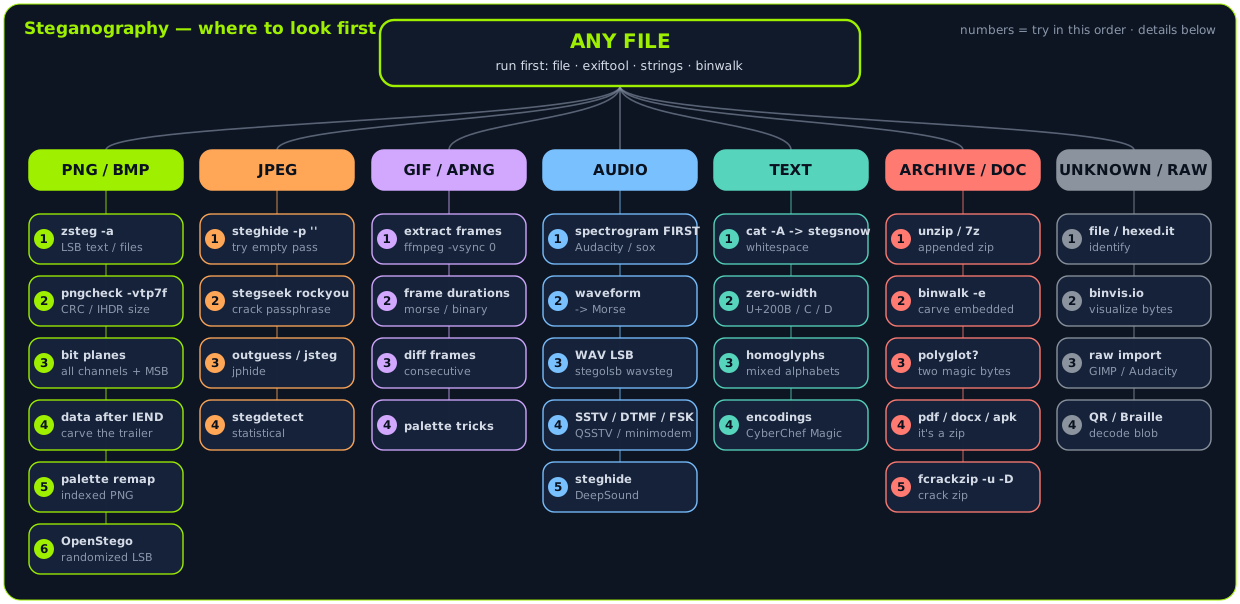
Click the map to open it full size. It is drawn in Excalidraw — grab the editable source to remix it at excalidraw.com.
Run these on every file first (all file types):
file target— trust it over the extension.exiftool -a -u -g1 target— Comment/Artist/GPS fields; extract the thumbnail (exiftool -b -ThumbnailImage target > thumb.jpg).strings -n 8 target— add-e l/-e bfor UTF-16 text.binwalk target— thenbinwalk -e targetif it lists a second file.
Image challenges
Lossless formats (PNG, BMP) hide data in pixel bits; lossy JPEG hides it in DCT coefficients — so the tools differ. Full detail: Images technique page.
PNG / BMP
- LSB text or files →
zsteg -a file.png, then extract the promising line withzsteg -E 'b1,rgb,lsb,xy' file.png > out.bin. zsteg - Corrupt or edited structure →
pngcheck -vtp7 file.png. A CRC error inIHDRmeans an edited header; a shrunken width/height hides pixels below the visible image. Repair with PCRT or brute-force the dimensions against the stored CRC. - Visual reveal → browse every bit plane and every channel including alpha with the decomposer or Stegsolve; try MSB and column-major order, not just RGB LSB.
- Appended data → data after the
IENDchunk;binwalk/ foremost, or carve the trailer by offset. - Palette tricks (indexed PNG) → randomize/remap the palette with color remapping.
- Randomized LSB → OpenStego (
openstego extract).
Check the alpha channel and MSB
zsteg reports the common combinations, but payloads hidden in the alpha channel, in the most-significant bit, or in column-major order are the classic "zsteg found nothing" traps. Browse all 32 planes.
JPEG
JPEG recompression destroys pixel LSBs, so zsteg does not work here.
- Passworded payload →
steghide info file.jpg, thensteghide extract -sf file.jpg -p ''(try the empty password first). steghide - Unknown password →
stegseek file.jpg /usr/share/wordlists/rockyou.txt(cracks rockyou in seconds). stegseek - Not steghide →
outguess -r file.jpg out.txt(OutGuess),jsteg reveal file.jpg out.txt(jsteg), or JPHide (jpseek).
Guess the password before brute-forcing
The passphrase is often the filename, the challenge name, the image
subject, or a string sitting in strings / exiftool output. Try those
before rockyou.
GIF / APNG
- Hidden frames → animations can carry zero-duration frames. Extract every
frame:
ffmpeg -i file.gif -vsync 0 out/f%d.png(orgifsicle --explode). - Message in frame durations → the per-frame delays can encode morse/binary/ASCII.
- Diff consecutive frames → a payload can live in the difference between two near-identical frames.
- Palette → same indexed-color tricks as PNG.
Audio
Full detail: Audio technique page.
- Spectrogram (always first) → view the frequency domain in
Audacity, Sonic Visualiser, or
sox file.wav -n spectrogram -o spec.png. Text and QR codes are often drawn there — check above 20 kHz and below 20 Hz too. - Waveform / Morse → obvious on/off bursts in the waveform.
- WAV LSB →
stegolsb wavsteg -r -i file.wav -o out.txt -n 1 -b 1000. - SSTV / DTMF / FSK → decode images with QSSTV, phone tones with a DTMF
decoder, modem tones with
minimodem/multimon-ng. - Passworded container → steghide (WAV/AU) or DeepSound.
Text & Unicode
Full detail: Text & Unicode technique page.
- Whitespace encoding → trailing spaces/tabs. Reveal with
cat -A file.txt; extract withstegsnow -C file.txt. stegsnow - Zero-width characters (U+200B/C/D) → invisible; inspect code points with
xxdor a zero-width decoder. Comparewc -cto the visible length. - Homoglyphs (Latin
avs Cyrillicа) → an Irongeek homoglyph decoder. - Encodings & esolangs → CyberChef Magic; Brainfuck/Whitespace/Piet/Malbolge via esolangs.org.
Files & Archives
Full detail: Files & Archives technique page.
- Appended archive →
unzip file.png/7z l file.pngoften just works; otherwisebinwalk -e. binwalk - Polyglot → a file valid as two formats (PDF/ZIP, JPEG/ZIP, GIF/JS).
filewill not flag it; check for multiple magic numbers and trailing data. - Documents →
.docx/.pptx/.jar/.apkare ZIPs:7z x file.docx. PDFs:pdfdetach -list/pdfdetach -saveall, inspect streams. - Password-protected ZIP →
fcrackzip -u -D -p rockyou.txt file.zip(ZipCrypto is weak; AES-256 is not).
Tell → Tool lookup
Jump straight to a technique from the symptom.
| Tell (symptom) | Try this |
|---|---|
| File is much bigger than it looks | binwalk -e · unzip |
A CTF{-ish string in plain strings |
strings -n 8, -e l/-e b |
| Odd EXIF Comment / weird metadata | exiftool -a -u -g1 |
| PNG/BMP, nothing in metadata | zsteg -a |
| Image won't open / looks cropped | pngcheck -vtp7 · PCRT |
| CRC error in IHDR | edit header / brute-force dimensions |
| JPEG + a password hint | steghide · stegseek rockyou |
| JPEG, steghide fails | outguess · jsteg |
| Static / blocks in an audio file | spectrogram, high-res (Audacity / sox -X -Y) |
| Stereo audio, silent when summed to mono | isolate / subtract channels (sox … remix) |
| Clean WAV, nothing in spectrogram | stegolsb wavsteg |
Invisible / trailing spaces in a .txt |
stegsnow -C · cat -A |
| Text copies "wrong" / mixed alphabets | zero-width / homoglyph decoder |
| Text too short / an emoji "holds" data | tag (U+E00xx) & variation-selector decoder |
.docx / .jar / .apk |
7z x (it is a ZIP) |
| ZipCrypto zip + a known inner file | bkcrack known-plaintext |
PDF with more than one %%EOF |
pdfresurrect -w (old revisions) |
| A QR / barcode in a file | zbarimg --raw |
| Nothing works, unknown blob | binvis.io · raw import (GIMP/Audacity) |
When stuck, check these
The recurring misses, from CTF writeups:
- Re-run
stringswith-e l/-e b, and extract the EXIF thumbnail — it sometimes shows the original, uncensored image. binwalk/foremostfor appended archives; tryunzip file.pngdirectly.- Browse every bit plane and every channel (R/G/B/Alpha), and try MSB, inverted, and column-major order — not just RGB LSB.
- On JPEG, always try the empty steghide password, then
stegseek rockyou, and also try the filename / challenge name / metadata as the passphrase. pngcheck -vtp7— a CRC error in IHDR means an edited header; check for a shrunken width/height hiding pixels and brute-force the dimensions against the stored CRC.- Indexed PNG/GIF: randomize the palette; for GIF/APNG check zero-duration frames and frame durations.
- Audio: spectrogram first, then waveform Morse, then WAV LSB, then SSTV/DTMF.
- Text files: look for trailing whitespace/tabs and
zero-width/homoglyph Unicode; compare
wc -cto the visible length. - Reverse-image-search (Google/Yandex) for the original cover, then XOR the stego against it in Stegsolve to isolate the edits.
- Reduce a media header size (WAV DataSize, PNG height) to reveal a cropped-out region.